

Protect Production When Trusted Access Turns Hostile
An engineer receives approval for 30 minutes of production database access to investigate a service issue. The identity is valid. The device is registered. MFA succeeded. The connection comes from an expected network.
But an attacker controls the engineer’s laptop and uses that approved session to query sensitive tables unrelated to the investigation.
From an authentication perspective, everything may look normal. From a data-security perspective, it is not.
A legitimate connection can carry malicious operations. Protecting production therefore requires more than deciding who can log in: it requires limiting what an approved session can do, observing what actually happens, and being able to stop access when trust changes.
This article brings together two complementary layers: production access architecture and Data Activity Monitoring (DAM). The architectural patterns and monitoring scenarios below should be validated against the selected integrations, connection modes, audit sources, and deployed Adaptive version. They are not a promise that every control is available natively in every environment.
How Trusted Access Becomes a Threat
A malicious insider intentionally misuses legitimate privileges. An employee whose laptop is compromised may have no malicious intent at all; an external attacker is abusing their access.
The distinction matters for investigation and response. But both scenarios expose the same weakness: a valid identity or approved session can be used for an unauthorized purpose.
For a compromised endpoint, the potential path looks like this:
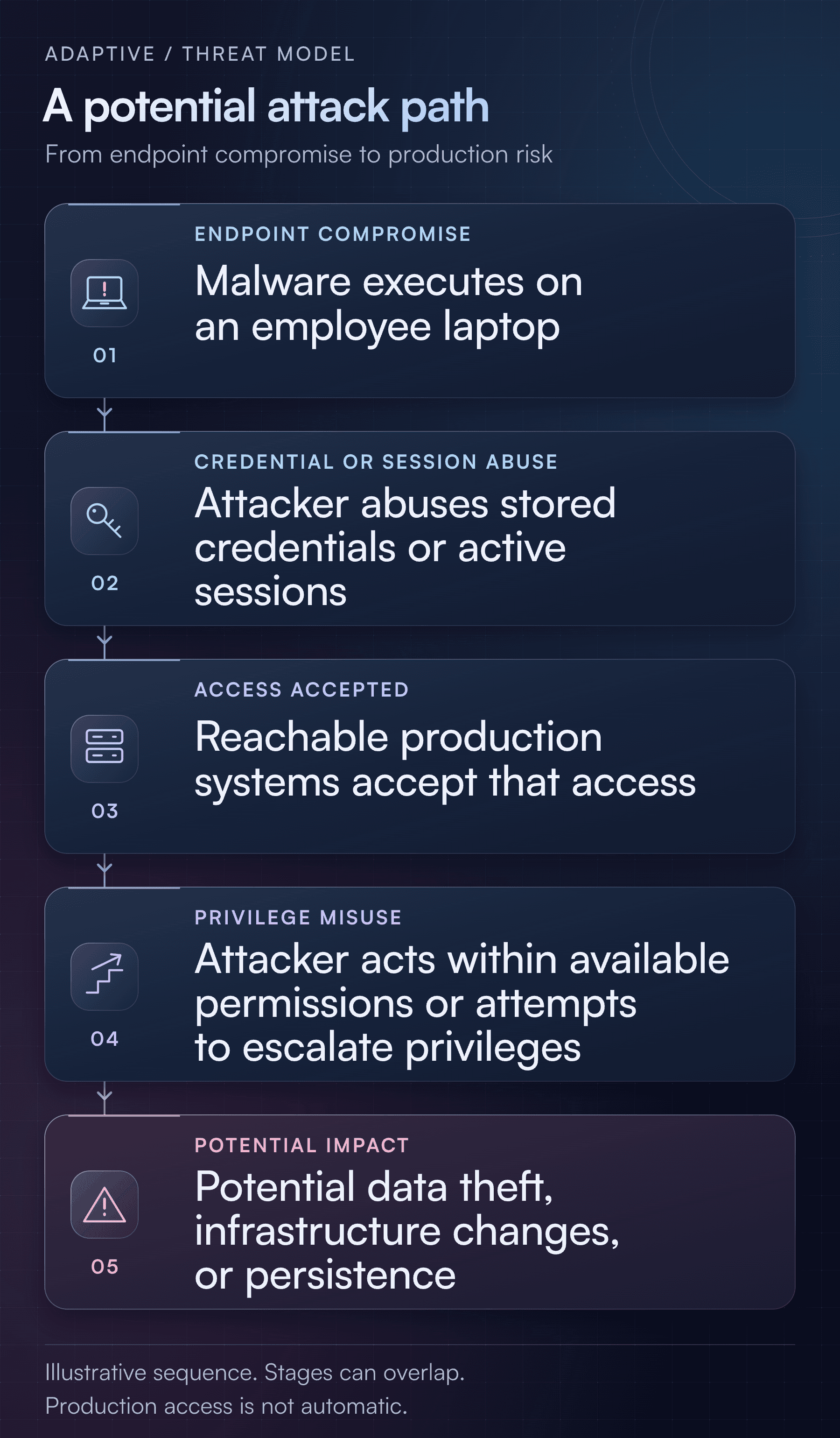
This is an illustrative threat model, not a claim about the sequence or outcome of a particular customer incident. Its stages can overlap, and device compromise does not automatically grant production access. The attacker still needs reachability, an accepted identity or session, and sufficient permissions.
VPN connectivity supplies a route, not authorization. MFA strengthens authentication, but does not eliminate abuse of an already authenticated endpoint. IP allowlists and device registration may also appear satisfied when the attacker operates through the employee’s actual machine.
Similarly, a session attributed to an employee does not prove that the employee, rather than someone controlling their device, performed an operation.
Remove Standing Production Privileges
The central design principle is straightforward:
The everyday laptop should not carry durable production authority. Constrain each access grant by resource, role, and duration—even for trusted employees.
Least privilege and just-in-time access reduce the opportunity for misuse, but neither makes an approved session harmless. A short-lived administrator role is still powerful while it is active. Read-only database access can still enable severe data theft.
A practical baseline includes:
- Resource-specific, time-bound access instead of broad standing privileges.
- Independent approval for sensitive roles, with no self-approval.
- Attributable identities rather than shared administrator accounts.
- Short-lived credentials, with target credentials kept server-side where supported.
- A mandatory controlled access path, without legacy routes or credentials that bypass it.
- Audit evidence stored separately from the users and resources being monitored.
- Revocation procedures that address both future connections and existing sessions.
Workload identities and application connections need their own controls; do not assume an interactive human-access design covers them automatically.
Four Architectures for Safer Production Access
These patterns can be combined. The appropriate boundary depends on the sensitivity of the resource and the power of the requested operation.
1. Mediate Access and Block Direct Connections
For teams that need local database clients, SSH tools, or Kubernetes CLIs, place an Adaptive-governed access layer between the laptop and production.
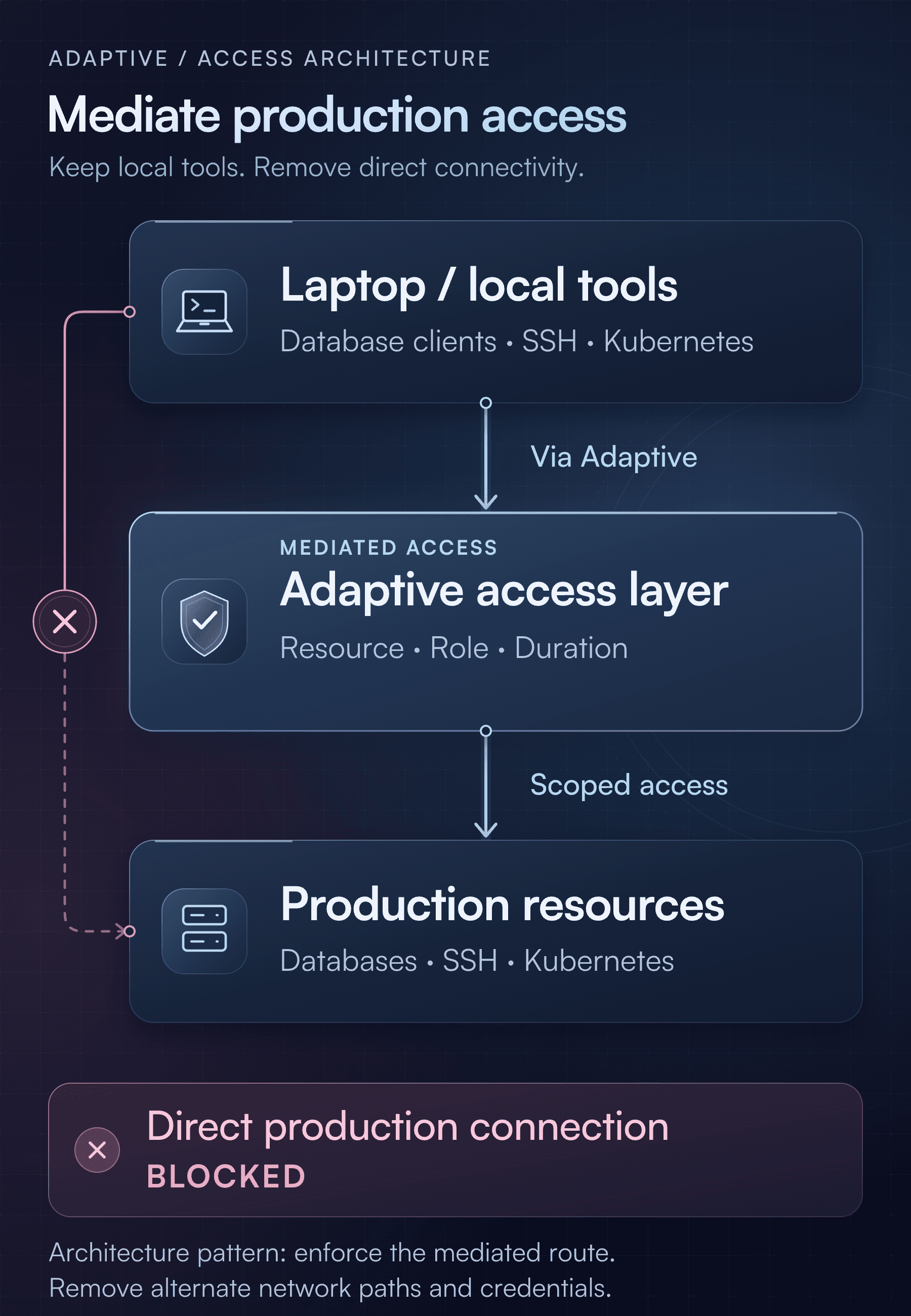
Restrict production management endpoints to approved access infrastructure. Remove direct laptop and VPN routes to database ports, SSH, and Kubernetes APIs. Replace persistent human credentials with scoped, short-lived access.
This reduces the combination of reachability and durable credentials available on the laptop. An attacker must operate through the allowed path, role, and access window.
Residual risk: Malware can still abuse an active authorized session or request access through the compromised identity. Credentials delivered to a compromised client may still be stolen. Old SSH keys, database users, administrator kubeconfigs, or alternate network routes can undermine the entire design.
2. Isolate Production Tools in a Remote Workspace
An ephemeral VDI environment, remote development workspace, or server-hosted tool environment can keep production clients, credentials, and files off everyday laptops.
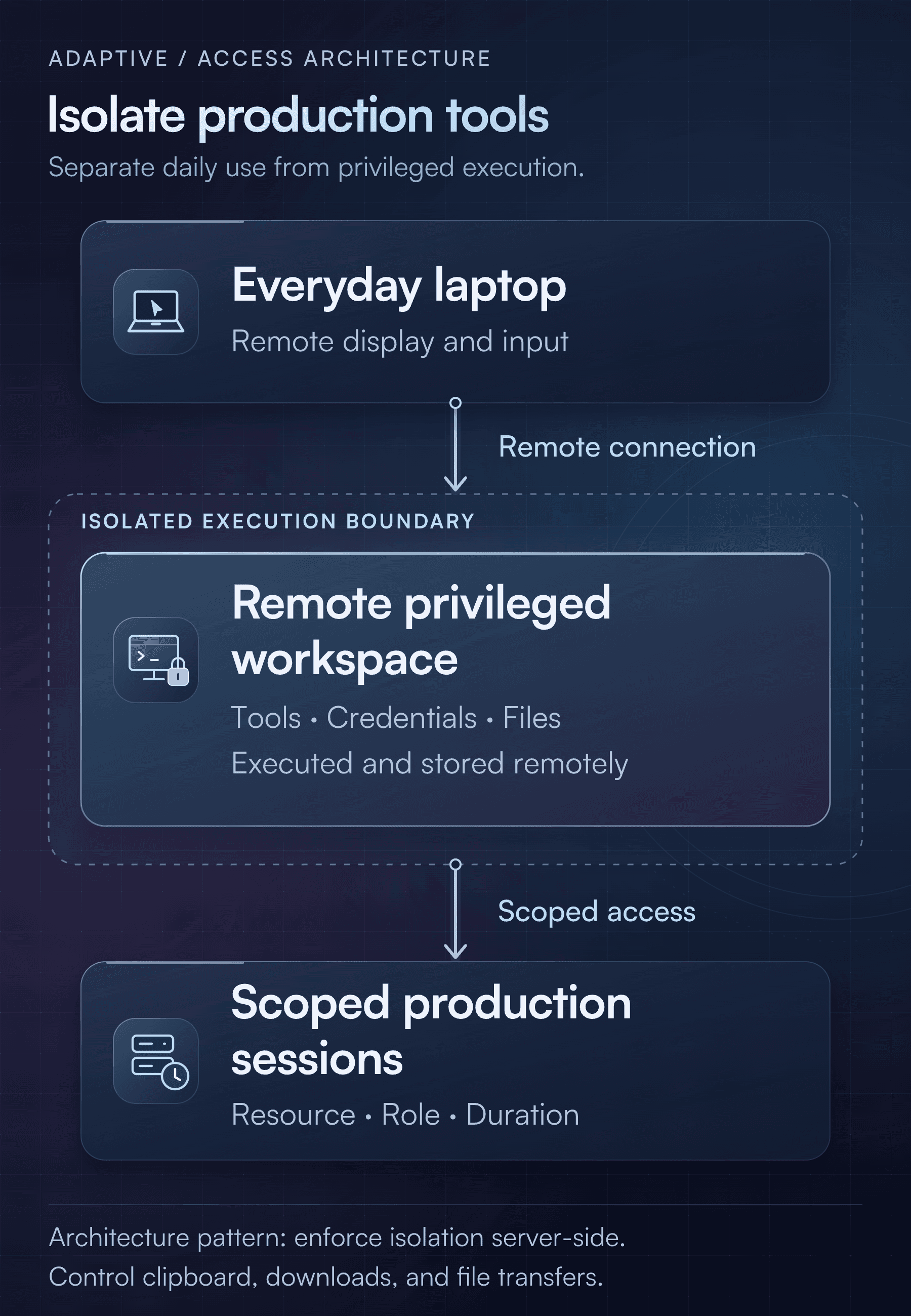
Isolation must be real: separate users and sessions, restrict software installation and internet egress, and control clipboard use, downloads, file transfers, and drive redirection as appropriate. Rebuild or destroy workspaces regularly, and give them time-bound permissions rather than permanent administrator access.
Residual risk: An attacker controlling the laptop can still manipulate the remote session and capture information displayed on screen. A browser interface alone is not an isolation boundary; execution, credential storage, and transfer controls must actually be enforced server-side.
3. Use a Dedicated Workstation for Privileged Administration
For DBAs, root administrators, and Kubernetes cluster administrators, a dedicated hardened workstation provides stronger separation from everyday browsing, email, and downloaded software.
Use a separate privileged identity, application allowlisting, endpoint detection and response (EDR), patching, phishing-resistant authentication, and trustworthy device validation. Ordinary devices should not be able to bypass the boundary through weaker enrollment or account-recovery paths.
Residual risk: The administrative workstation can also be compromised. Keep approvals, narrow roles, time limits, and monitoring. Device separation reduces endpoint exposure; it does not prevent an authorized insider from misusing permitted actions.
4. Replace Interactive Access With Approved Tasks
Many operational jobs do not require an open-ended shell. Restarting one service, retrieving bounded logs, running a predefined diagnostic query, or deploying an approved artifact can be expressed as a constrained task.
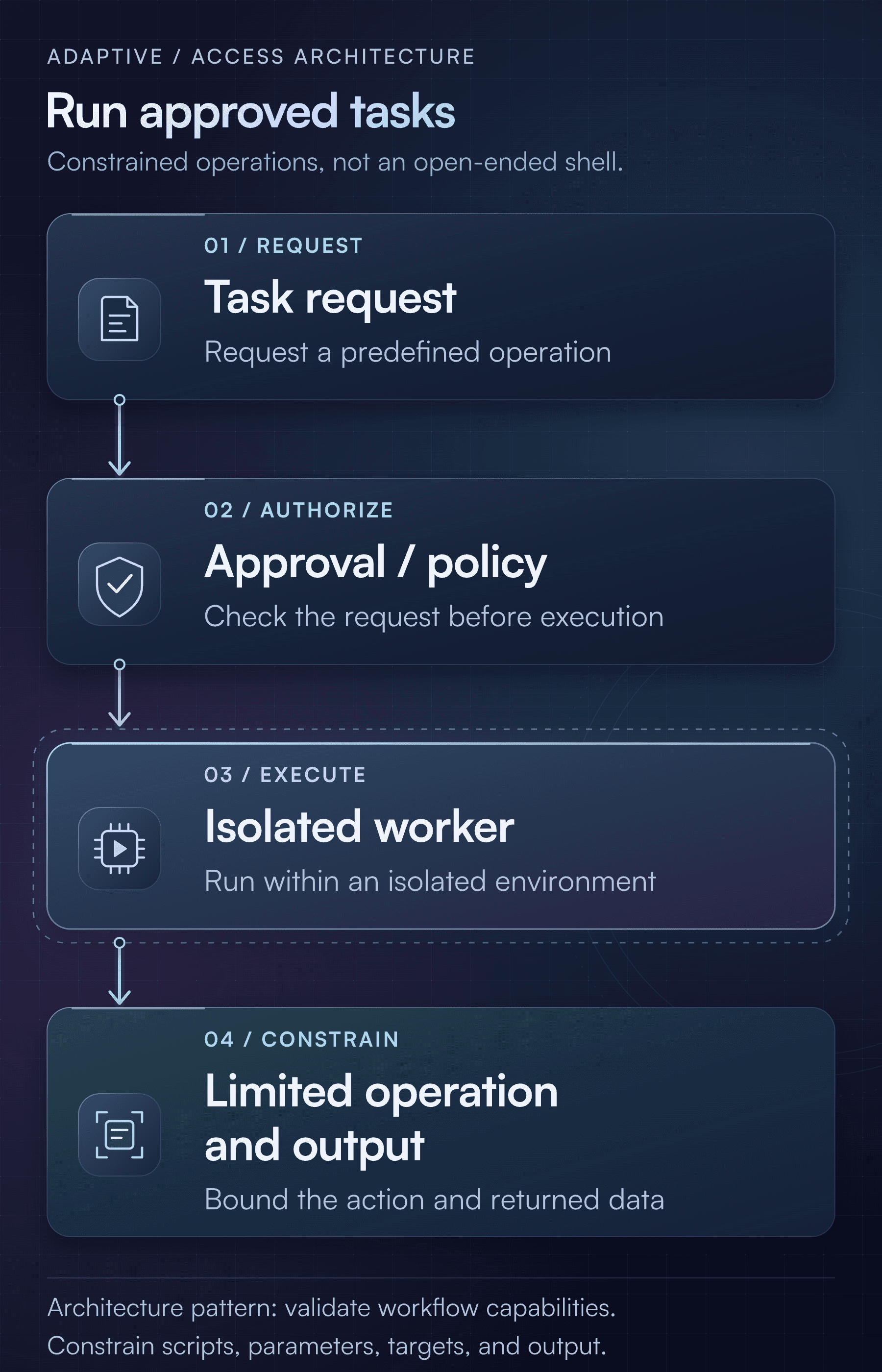
This gives a compromised endpoint fewer options than a general-purpose production session.
Residual risk: Arbitrary commands, editable scripts, unsafe parameters, and redirectable targets can turn a task runner back into administrator access. Validate the execution and approval capabilities required for each workflow rather than assuming they are already supported.
Monitor What Happens After Access Is Granted
Access logs can establish that a user connected to a database. They may not explain what happened next.
For supported integrations and configured audit sources, Adaptive Data Activity Monitoring can help expose queries, data changes, schema operations, administrative actions, and denied operations where the source records them.
The investigative question becomes:
Which identity performed which operation, against which resource, at what time, and in which session?
Where available, correlate those events with the approval, source device or IP, and affected database objects. Demonstrate the mapping in the actual environment—especially where shared, temporary, or pooled database connections complicate attribution.
Consider the engineer with 30 minutes of approved read-only access. A connection log may show an expected login. Operation-level evidence may instead reveal queries against customer records unrelated to the service issue.
That does not automatically prove malicious intent, but it gives investigators something concrete to evaluate against the approved task.
Recognize Signs of Session Misuse
The following are detection scenarios to configure and test, not claims of universally available anomaly detection or automatic blocking.
| Observed pattern | Why it deserves investigation |
|---|---|
| Sensitive-table reads unrelated to the approved task | Possible misuse of otherwise valid access |
| Broad queries across many schemas or tables | Possible reconnaissance or data collection |
| Repeated large reads or exports, where telemetry exposes them | Possible exfiltration |
| User creation or elevated permission grants | Possible escalation or persistence |
| DROP, TRUNCATE, or broad deletes | Potential sabotage or operational error |
| Permission failures followed by success | Possible exploration of available privileges |
| Attempts to disable auditing | Possible concealment |
Comparing activity with business purpose may require approval context, SIEM correlation, or analyst review. Normal-looking queries can retrieve valuable data, and low-volume theft may evade simple thresholds.
A SELECT statement alone may not reveal the rows or bytes delivered to a client. Query logs do not necessarily prove data left the organization. Monitoring is evidence, not automatically inline prevention: recording a dangerous statement does not mean it was blocked before execution.
Native permissions and other enforcement controls remain essential.
Identify Sensitive Data and Protect Audit Evidence
Data discovery can help distinguish an ordinary table read from access to an object containing personal information, financial records, or credentials.
The combination is useful:
- Discovery identifies sensitive objects.
- Access governance limits who can reach them.
- DAM shows observed operations against them.
Object-level classification does not prove that a query returned particular sensitive values, and discovery does not itself prevent exfiltration. It helps prioritize controls and investigations.
For a compromised-endpoint threat model, prefer server-side or database-native evidence over relying solely on recordings uploaded by the laptop. Malware may interfere with client-side collection, and activity that bypasses the monitored access path needs independent telemetry.
Protect audit storage separately, prevent routine users from disabling collection or deleting evidence, and monitor ingestion health and delays. Define retention and tightly control access to query text and recordings: monitoring data can itself contain confidential information or secrets.
Database DAM also needs complementary sources:
| Target | Useful evidence | Coverage boundary |
|---|---|---|
| Databases | Queries, changes, administrative and denied operations | Detail depends on the integration and audit configuration |
| Servers | SSH recordings, command execution, host audit events | Terminal recordings may miss unrelated background activity |
| Kubernetes | API audit events, object and RBAC changes, exec and port-forward initiation | An exec event does not necessarily contain commands run inside a container |
Do not treat database monitoring as complete server or Kubernetes visibility.
Revoke Access and Terminate Active Sessions
When an EDR alert identifies a compromised device, the response should cross endpoint, identity, access, and resource boundaries:
- Isolate the endpoint through EDR.
- Revoke identity sessions and tokens.
- Deny new Adaptive access and revoke affected grants.
- Terminate active production sessions through the appropriate enforcement points.
- Review and rotate exposed credentials.
- Investigate data access, target-system changes, and persistence already established.
These steps require explicit integration and testing. Device inventory is not continuous device-health enforcement, and alerts or automatic response should not be assumed without configuration and validation.
Grant revocation is not necessarily connection termination. Database connections may survive credential expiry, SSH sessions may survive key removal, and Kubernetes exec or port-forward streams may survive authorization changes.
Measure both the time to deny new access and the time to stop established connections. Closing a session also does not undo changes an attacker has already made.
Build and Test Risk-Based Access Controls
A tiered model avoids giving every operational task the same broad privilege:
| Access need | Recommended approach |
|---|---|
| Development and low-risk resources | Local tools through controlled, scoped access |
| Routine production diagnostics | Read-only access; remote workspace where warranted |
| Production changes | Narrow roles, short windows, independent approval |
| DBA, root, and cluster administration | Dedicated privileged workstation, optionally with remote isolation |
| Repeatable operations | Approved tasks instead of interactive sessions |
| Emergency access | Separate, tightly controlled break-glass access with monitoring and post-use review |
Apply resource-specific safeguards. Restrict database schemas, tables, and exports as appropriate. Use non-root server access and narrow privilege escalation. For Kubernetes, carefully restrict secrets, exec, port-forwarding, RBAC changes, and privileged workloads; namespace scope alone does not make access safe.
Then validate the design in an authorized test environment using synthetic data. No malware deployment is necessary.
- Test bypasses: Direct database, SSH, and Kubernetes access outside the controlled path should fail. Include legacy credentials and break-glass routes.
- Inspect credential exposure: Identify which secrets reach the laptop and whether they work elsewhere or after expiry.
- Verify privilege boundaries: Confirm a scoped user cannot reach unrelated resources or higher-privilege roles.
- Assume an active session is compromised: Document exactly what remains possible during an approval window.
- Exercise monitoring: Perform a sensitive-table read, an authorized test modification, and a denied privilege change. Show what was captured—and what was not.
- Exercise response: Measure new-access denial and established-session termination for each protocol.
- Reconstruct the evidence: Correlate approval, identity, resource, timing, and supported operations. Confirm evidence survives revocation and test collection failures.
Agree on event coverage, ingestion latency, attribution, retention, detection behavior, and response latency before a proof of value or contractual commitment.
Limit, Monitor, and Revoke Production Access
Adaptive complements endpoint and identity security; it does not prevent malware installation, make a compromised laptop trustworthy, or guarantee that an authenticated employee has legitimate intent.
Its role in this architecture is to help limit, detect, and contain production access misuse through scoped, time-bound access and session accountability, complemented by supported data activity monitoring and a tested response process.
The useful question is not only, “Can this employee connect?” It is:
“If this identity or device is misused right now, what can it reach, what can it do, what will we observe, and how quickly can we stop it?”
Design for that question, and a trusted login no longer has to mean unrestricted trust.




 |
| SOC2 Type II
